I
I live in Obsidian. My whole second brain sits in a git-versioned vault, and I open it every single day – for notes, work tasks, personal tasks, blog drafts, projects, everything. So if I'm staring at the same editor for hours, it might as well look the way I want.
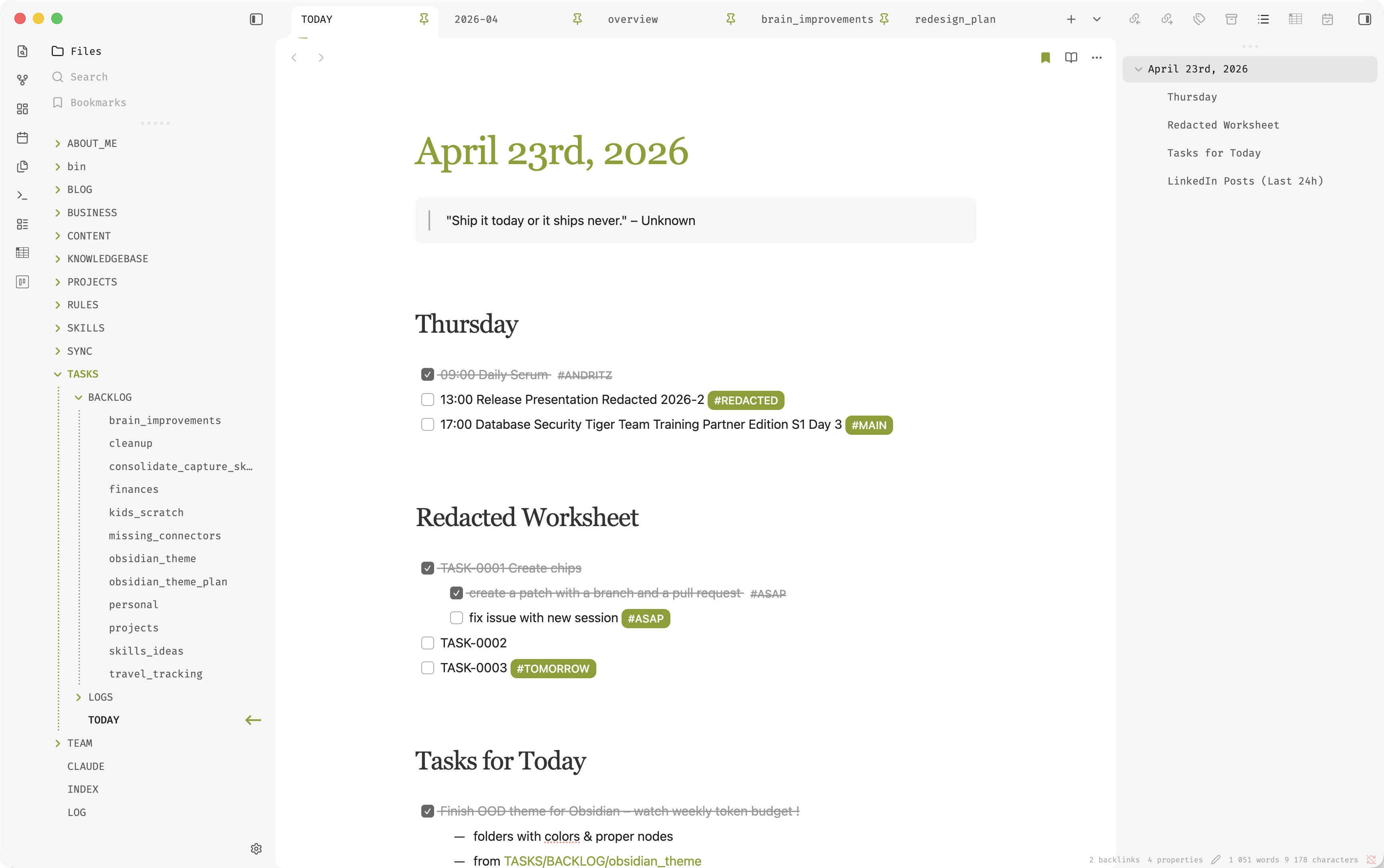
That's how I ended up building my own theme: One Oracle Developer. Catchy name, huh? It's a fork of the excellent Baseline theme, with a few tweaks on top.
Why fork
Create a theme from scratch is extremely demanding and time consuming. I checked all themes in Obsidian, and 95% of them were total garbage. Baseline was almost perfect, but I had to make a few small tweaks here and there so it works better with lists, checklists, and tags. I also adjusted the headers and fonts. The biggest issue was the folders/files tree, which felt a bit dull.
Install Baseline and my theme and compare them yourself.
What's different
The theme is opinionated but small. Here's what it changes:
- Serif headings. H1–H6 render in Source Serif Pro with explicit sizes. Headings read like a book, not a UI component.
- Accent-colored heading underlines. H1 is a bold accent line, H2 is thinner, H3 is faded. Hierarchy you can see at a glance.
- Active-line highlight. The line with the cursor gets a faint accent tint in the editor.
- Tab bar polish. Active tab gets a thin accent underline instead of a heavy background flood.
- Accent scrollbar on hover. Thumb turns accent-colored while you're scrolling, default width otherwise.
- Hidden frontmatter properties. The properties block is auto-hidden in Live Preview and Reading view. Properties are still editable via command palette and right sidebar.
- Readable strikethrough. Completed tasks and struck text stay legible in grey instead of disappearing.
- Accent tag pills. Tags render as solid pills with white text. Easier to scan than the default outline style.
No hardcoded hex
The theme ships without a single hardcoded accent color. Everything rides Obsidian's built-in "--interactive-accent" variable, which flips automatically when you change your accent in Settings.
body {
    --ood-accent-bg-weak: color-mix(in srgb, var(--interactive-accent) 10%, transparent);
    --ood-accent-bg-hover: color-mix(in srgb, var(--interactive-accent) 18%, transparent);
    --ood-accent-underline-width: 2px;
}
Pick olive-green, pick royal-blue, pick whatever and the theme will adapt.
Where to get it
The repo is at github.com/jkvetina/obsidian-one-oracle-developer. Once the community directory PR is merged, it'll show up in Settings - Appearance - Manage - Browse. Until then, drop the folder into ".obsidian/themes/One Oracle Developer" manually and pick it from the dropdown.
If you try this theme and you like it, pass it on to someone who stares at Obsidian as much as you do. Thanks.
That is all for today.
Great post! Im also a big Obsidian fan, and funnily enough, my vault is called Second Brain too. :D
ReplyDeleteHave you tried using any AI tools directly with your Obsidian vault? I recently let Codex help me organize and restructure some of my notes, and it has been quite useful.
Have you experimented with AI in your Obsidian workflow as well?
Since this article I improved my setup a lot, specially the Obsidian. I dont have any plugin in Obsidian to access AI, but I am considering adding Claude. So far my BRAIN folder is Obsidina nault, Claude and Codex project folder and private Git repo at the same time. This works wonders. In Obsidian I have a rich Dashboard for my daily tasks, projects, clients, finances, blog... and in Obsidian I created Kanban plugin and custom buttons which is all tight to Claude actions, so I dont really feel the need for a better AI integration.
Deletenice post
ReplyDelete